![[Jcount.com]](https://www.jcount.com/wp-content/uploads/2014/08/jcount150X50.png)
![[Jcount.com]](https://www.jcount.com/wp-content/uploads/2014/08/jcountstartupslogo1.png)


What is a CRM
If you are in the business world, you might have heard this word thrown around – CRM. A lot of people aren’t sure what a CRM software does. So let me quickly set the meaning of a CRM, why a business needs CRM and what the best CRM tools are.
CRM stands for customer relationship management. Initially CRM softwares were built to keep a track of your customers whenever they interacted with your business. Now, this has been advanced and there is a lot more to a CRM. Some features includes
- Keeping a track record of all interactions of the customer (Sales, Customer Care)
- Keeping a track of their purchases, history, pages visited etc
- Marketing automation based on data collected over time
- Email Integration
- Sales Forecasting
- Analytics
As you can see, CRM is necessary for a business to run efficiently. It creates a structured process for the data you deal with and makes your business lean, updated and most importantly high performing.
What types of businesses need CRM
Every business that has reached a certain customer threshold, needs a CRM. You can be a small company with 3 employees, but still handling hundreds of customers. This sort of situation needs a CRM system. It goes without saying, a large organization with thousands of employees and thousands of clients, definitely needs a CRM.
There are customer relationship management tools specific for certain functions and certain industries and you’ll need to get the one that suits you best. Today we’ll review CRM software for 2018.
- SAP Hybris
SAP is a popular company for their accounting software. But, SAP being a software development company, they have expanded their offerings and have built tools in the ERP(Enterprise Resource Planning) and CRM space.
Their CRM offering is called Hybris.
Hybris works across different requirements like Sales and Services, as an example.
SAP Hybris sales cloud
The sales cloud from SAP offers a customized CRM for sales development representatives. It boasts a hosts of features. Let’s get into a few of them.
- Lead Scoring
Lead scoring is a top feature that rates leads depending on their propensity to convert. This immediately helps sales teams to identify the most qualified leads and service them accordingly to increase revenue.
With a solid lead scoring system, revenue will keep growing and effort is not wasted on not so serious leads.
- Best Customer Relationships
Sales is very dependent on likeability. When you have a great product pitched by a salesperson who is not well liked, the deal going down is very likely.
The system identifies the person who is most likely to have the best interaction with a client and pairs them. This helps in improving the odds in closing a deal.
- Immediate access to Data
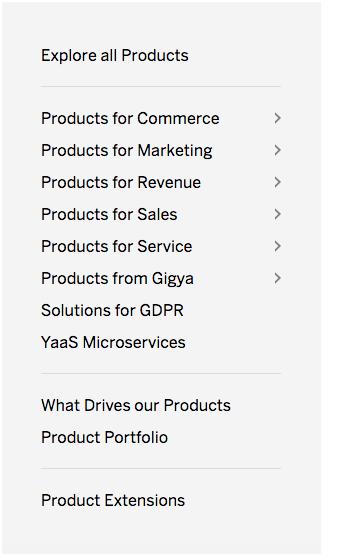
The system gives access to relevant information like quotes, information about the company handy that can be sent to the customer immediately.
Hybris also offers custom solutions for very specific use cases like E-commerce, Marketing, Services. They go a step further by customizing software for B2B and B2C. This makes SAP Hybris one of the best CRM tools out there.
Pricing : License based
- ZOHO CRM
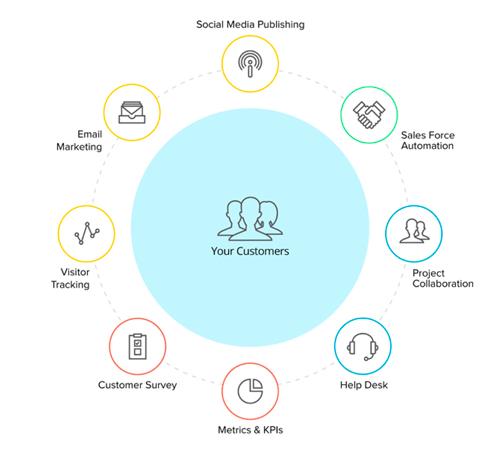
Zoho is a SAAS(Software as a service) CRM tool. It is one of the most popular CRM’s in the world. It is an all encompassing tool that manages Sales, Marketing, Inventory, Email etc. All in one tool.
It’s free for up to 3 users. Post that, it starts at $12 per user.
Zoho’s pricing makes it one of the most reasonable CRM tools out there. The basic plan covers.
- Sales Forecasting
- Scoring Rules
- Custom Fields
Zoho can be customized to your needs, but it doesn’t come customized by default.
One of Zoho’s top features is the suite of apps you get access to. Apart from the CRM, the user gets access to emails, online storage, web meetings etc
The $20 plan comes with
- Google Adwords Integration
- Social CRM
- Workflows and Macros
Social CRM’s are basically integrating social media platforms into your CRM. Facebook, Twitter and other similar social platforms are used as grievance platforms and marketing platforms. All the action on these platforms need to be tracked and classified accordingly. This makes Zoho, a must have tool because a huge component of social is taken care of in the $20 plan.
One of the top used features in Zoho is by the Administration team. They use it to store documents. Another feature that is widely used is invoice generation, which is a breeze to use.
The best part about Zoho is there is no getting tied up with long-term contracts and the monthly plans make it easy to cancel any time.
Pricing : Starts at $12/month
- ACT CRM
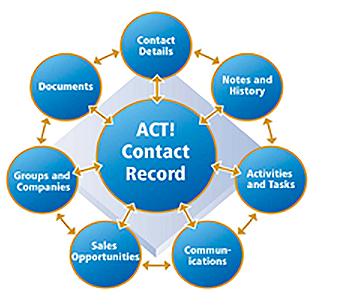
ACT is a 30 year old organization. They’ve been in the CRM business for this long. ACT has been identified as one of the most affordable CRM’s.
It is also targeted at smaller businesses. The price and feature list reflect that. ACT CRM specialise in certain features and I want to discuss that.
Contact Management
You can see all the list of contacts in one place with all their information. Managing individual companies also become a breeze. You can group companies based on their industry or size. This also helps in sending targeted mass communication.
Marketing and Sales
ACT makes it easy to do marketing and sales. With pre-built templates you can send ready made emails depending on the interaction you’ve had with the client.
The Sales process is similar to SAP. You can list the status of a deal depending on which stage it is in. Example, negotiation stage or initial commitment etc.
Data
ACT provides incredible insights into sales numbers and how the business is performing. There’s a feature called Call Lists which lists the prospects based on the number of interactions they’ve had. More the interactions, more likely the sale will close.
ACT’s integration list is admirable. Their tool integrates with around 800 tools using Zapier.
They have Mobile Apps which make it easy to access all of your business’ information. This helps especially for a smaller business that requires the attention of the owner constantly where ever they are.
If you want more features, ACT has premium plans starting from $35 and above. These plans include Ecommerce connections, Secure Cloud Hosting, Unlimited Customizations etc.
Pricing : Starts at $10/month
- Infor CRM
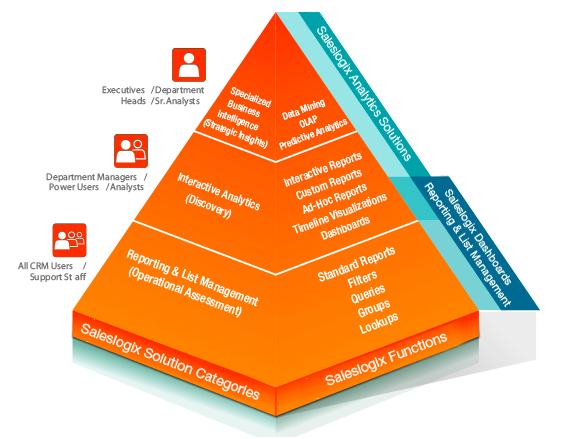
Inform CRM is a perfect offering to medium to large businesses. It’s a truly customizable tool for different use cases.
It’s a full end to end CRM that includes HR and Finance functions as well which is lacking in most CRM products. With these features, Infor becomes the only software you need for day to day operations of a business across all departments.
Infor focuses on 3 main business tasks. Sales, Marketing and Customer Service. These tasks are customized for every Industry. Infor CRM seems to have the most customized CRM solutions across industries. They cover Distribution, Manufacturing, Retail, Construction, Hospitality, Health Care, Public Sector etc.
How companies use Infor
Why this tool is suggested for larger organizations is because, you’ll need a certain level of business process and structure to use the tool. Smaller businesses that don’t have this process or run antiquated marketing will not benefit from Infor.
The best part about Infor is the level of customization, but this also requires preparation time. So before a company embarks on implementing this CRM. It’s important to understand, the needs, the actions to be tracked and the results required by the company.
One of the best use cases for Infor is the performance management. You can identify the top performing professionals in your organization.
Setting up and Integrating is a breeze with the Infor CRM.
Pricing : Starts at $25/month
- SAGE CRM
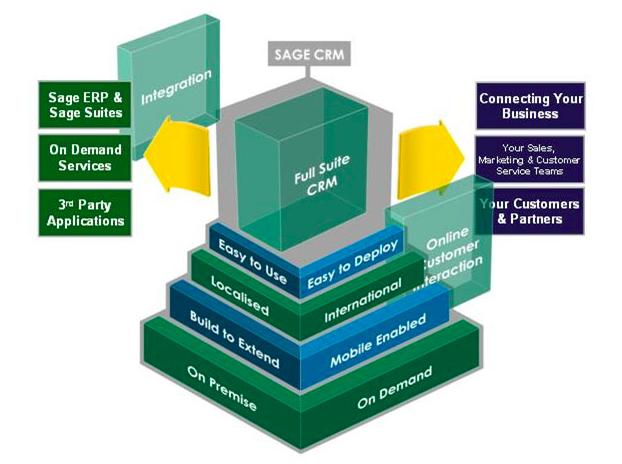
Apart from catering to sales and marketing teams, one USP that Sage has is their impact on productivity. Building a solution that is cross-functional and across teams makes companies very productive.
How companies use Sage
One of the main uses for Sage is storing client information and making reports. The reports are templates, which makes it easy to generate one. The documentation is fairly simple which makes it an easy CRM to use.
The robustness of the tool is something users need to consider. It can be used by different departments with fair ease. It’s an all round tool that benefits the organization.
The customization options are endless with unlimited fields, which means it can be customized to each and every company’s particular requirement.
Pricing : Starts at $69 a month
Implementing a CRM Software
CRM software are not your regular run of the mill plug and play software. They need to be implemented within your organization. This is generally done with professional experts. There are things that need to be considered before a CRM implementation.
Points to note before a CRM Implementation
Did you know there are unsuccessful CRM implementations? This happens when teams don’t use the tool and don’t find success from the product.
To successfully implement a CRM project, you need all hands on board. This means from the top management to the lowest tier of the company hierarchy. You just don’t implement CRM in a day. So here are a few tips and strategies for successful CRM implementation.
- The Board should be on Board
A CRM system is unlikely to succeed if the top management isn’t in all. If there are leaders who are refusing to use the system or don’t want to make changes to their existing process, then there’s going to be a problem. You cannot have rogue teams within the company which don’t follow the processes. So if there’s a leader who is refusing to implement CRM, there’s no point in continuing without convincing them of the benefits.
- Preparing for the CRM
It’s not easy for one person to start using a tool out of the blue and forming a habit of using it. It’s much more harder to get thousands of employees to start using it. Before the CRM is implemented, feedback needs to be gauged. All team leaders should be brought in and implementing the CRM should be discussed. In turn, they go and speak to their team and understand the main problems plaguing a particular team. This feedback will help in customizing the tool to the needs of each team.
- Marketing the CRM
Change is hard. It involves revising old habits. And people in workplaces do not want to change their processes. To use a new CRM, needs change. This puts a lot of pressure on the employees and there will be pushback. There will be questions like ‘Why do we need to do this’?
For this reason, there should be an internal marketing process where the CRM is promoted. The benefits need to be spoken about. How much time does the CRM save? How productive it will make the employee etc.
These pitches and presentations need to come from the top management, then only the adoption will be smooth.
- Training
This is the last but the most important point of a successful CRM implementation. Plug and play does not work when there are thousands of employees involved.
Generally CRM needs to be implemented by an outside organization that has the training and experience in implementing a CRM.
There needs to be extensive training sessions, where all the employees are trained on how to use the tool. Documentation needs to be shared that acts as a quick checklist for the employee.
Even the top management need to be trained to use the tool effectively. What reports do they generate, what numbers do they see etc?
Conclusion
There you have it. CRM’s are an absolute requirement for an organization of a certain size. It helps in improving the customer experience considerably. Also, the range of CRM options available are great, you can be a small organization or a large one, there are different price points and different features catered to your situation. You can further increase transparency inside your organization and make better use of data with a data integration tool that connects your CRM to your ERP or maketplace. For larger organizations, data integration is essential, while smaller ones, can very easily accomplish all their data goals by only using a good CRM.
Many countries especially developed countries have adopted CRM. CRM software in Malaysia, Singapore and other asian countries are just picking up.
For organizations that aren’t sure about what CRM to pick and how to implement it, there are professional companies that specialize in CRM implementation. They show you CRM examples of similar companies that aid in giving you an idea of how your company will benefit.
Finding a relevant organization in and around your area of business will benefit you in the long run.
CRM implementation companies like Plexure Singapore also train your entire company on how to use the tool and help you with ironing out any issues that arise.


