![[Jcount.com]](https://www.jcount.com/wp-content/uploads/2014/08/jcount150X50.png)
![[Jcount.com]](https://www.jcount.com/wp-content/uploads/2014/08/jcountstartupslogo1.png)

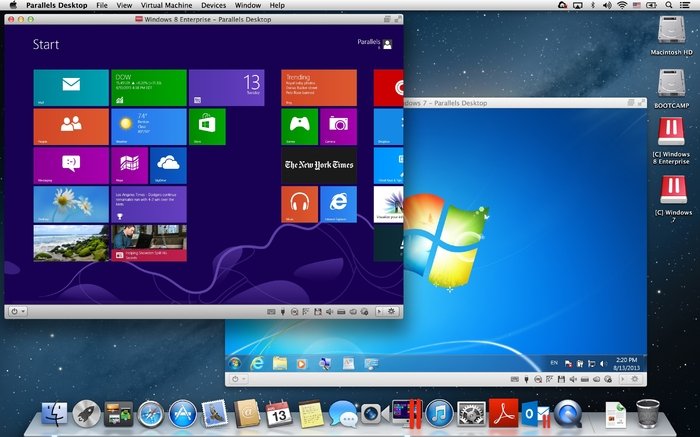
As an expert in computer tech support on both Mac and PC environments, I often need to switch between the two. Windows runs pretty well on a Mac. In fact, we live in times where Mac and Windows operating systems can get along with each other very well. However, that wasn’t always the case. At the beginning of the Mac era, back in the 90’s, the first way to make a Mac run Windows was provided by the company Connectix. At that time, the Windows Virtualization has been possible using Virtual PC, a software that allowed you to launch a separate window on your Mac desktop, running a copy of Microsoft Windows. Luckily, I’ve found a better solution available today.
What is Parallels Desktop?
Since the 90’s, the both the hardware and software technology greatly evolved. Optimized virtualization has become possible by taking advantage of the Intel Core technology. Parallels Desktop for Mac, a software first released in the 2006, is using hypervisor technology that maps on a virtual machine the host computer’s hardware resources. The virtualization technology used by Parallels Desktop software is requiring its own system resources such as video RAM, memory and processor. Windows virtualization is much improved by this reliable app. Since its first release, Parallels Desktop continues improving its product.
The Bellevue, Wash.-based company has shipped its Parallels Desktop version 12 in Fall 2016. This is the version of the Windows virtualization that I’m using at the moment.A few use cases are supported by Parallels Desktop 12. Among them, the most important are the multi-platform development and the legacy application support. These are two very different scenarios that touch the edges of the software’s intended use. However, you can just use Parallels Desktop 12 to runs Windows apps with good performance and great elegance.
What Parallels Desktop App Does?
The most prevalent use case of the Parallels Desktop app is running Windows on a Mac environment. As a tech support expert, I need to keep old Windows programs. However, I prefer to work on a Mac Pro rather than on a PC. Same as me, many people may need to keep running old software, still supported or not. Using a virtualization solution allows you to keep old hardware and software running. Parallels Desktop makes also a great choice for those who need a Windows app to complement their regular Mac work experience. The virtualization software even goes beyond Windows running on a Mac, allowing people to experiment with a number of other operating systems.
How much Parallels Desktop costs?
The virtualization software comes in three editions for Mac: Business, Pro and Desktop. The Business edition adds a unified volume license key, along with a centralized management and administration. The Pro edition increases up to 64 GB the virtual RAM support. Both Business and Pro versions include a plug-in for Visual Studio. The Desktop 12 for Mac edition will likely be enough for limited personal use, but for Developers is recommended to get the Pro edition. If you want to deploy the tools in an enterprise setting, then you should take into consideration acquiring the Business edition.
The price for Parallels Desktop 12 download and perpetual use license is a one-time fee of $79.99, or a $79 annual subscription. For Business and Pro editions are available $99.99 annual subscriptions. Parallels promo codes are available online. Look for a parallels discount coupon or promotion at spiqy.com/parallels-coupons.


